Case Study,
Improving the Export Report Experience
System UX Case Study — JSWE (Jewel Suite Well Engineering)
A UX‑led initiative to redesign a critical reporting workflow in a complex engineering platform. By addressing usability, consistency, and scalability issues, this project transformed a fragmented reporting experience into a centralized, fit‑to‑purpose system used by all user roles.

Before - one button

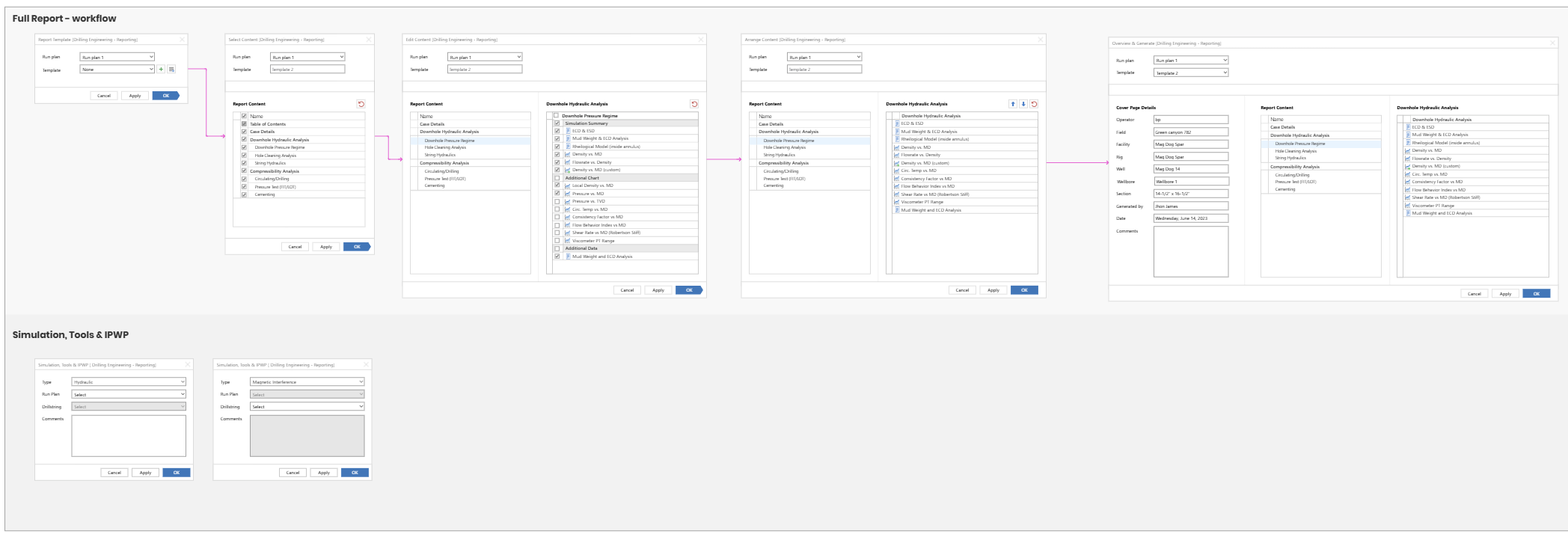
After - A workflow

Goal
Simplify the export report flow, reduce failures and accelerate use.

Impact
Improve user success rate and reduce time spent configuring report exports.

Success Metric
Increase successful exports and improve overall user satisfaction.
Product Context & System Constraints
Jewel Suite Well Engineering (JSWE) is a simulation software used by application engineers, drilling engineers, real‑time engineers, and support teams for onshore and offshore drilling workflows.
While not all users rely on the full software, every user depends on reporting. As the platform expanded, the Generate Report feature became increasingly complex, inconsistent, and difficult to use—despite being one of the most critical workflows in the system.
User research revealed that the reporting experience was no longer keeping pace with:
New user needs
New report types
Increased workflow complexity
This was not a cosmetic issue, but a system‑level usability problem affecting productivity across teams.
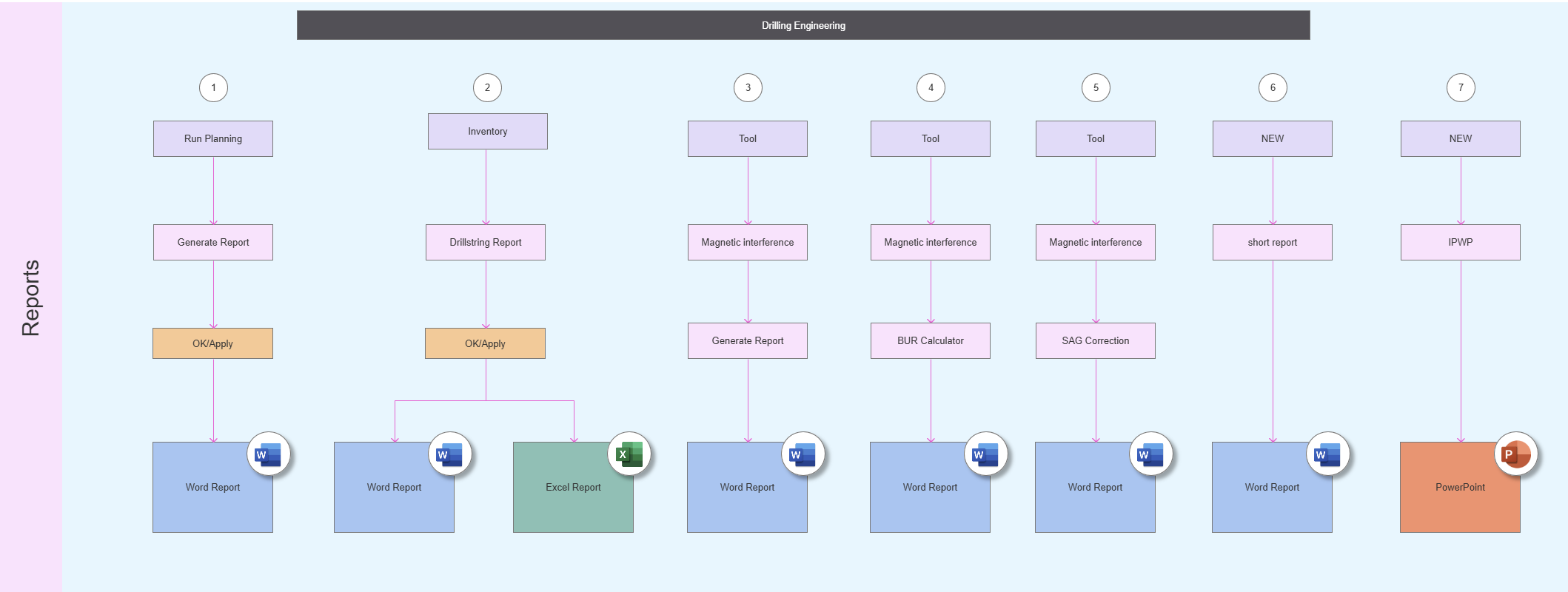
Current Reporting Ecosystem (simplified)
7 entry points to export a report
Role, Responsibilities & Design Scope
I initiated and led this project as Lead Senior UX Designer.
My responsibilities included:
User research and usability evaluation
Defining the problem and opportunity
Facilitating workshops with SMEs, product, and engineering
Designing the end‑to‑end reporting experience
Building a business case and securing stakeholder buy‑in
Supporting development through implementation and release
The Challenge
The existing Generate Report dialog had grown into a single, overloaded form that attempted to support too many use cases at once.
Key issues:
The form was visually and cognitively complex
Mandatory and optional steps were mixed without clear hierarchy
Important features such as “Save as Template” went unnoticed
A new short, one‑page report type had no clear place in the system
Reporting options were scattered across the software with no consistency in location, layout, or process
As a result, users spent unnecessary time creating reports, and the system failed to support efficient, professional output.
Key Experience & System Challenges
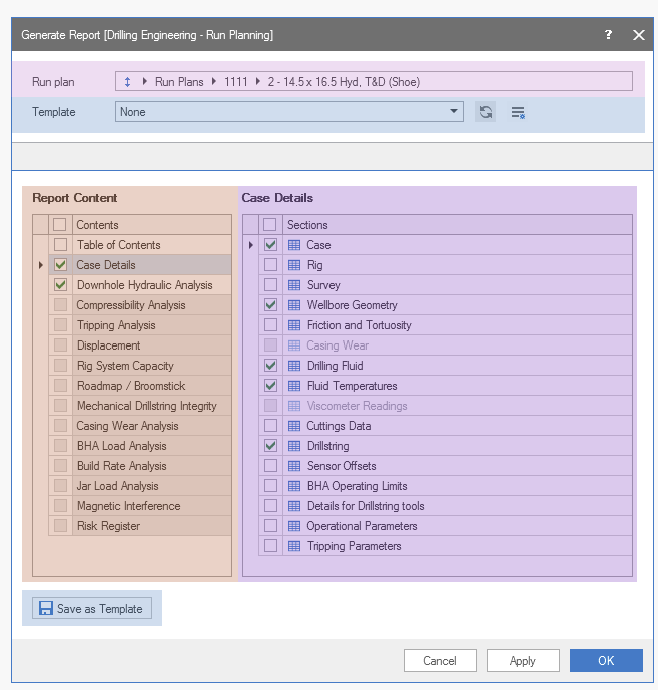
1. Overloaded Form Structure
The Generate Report dialog compressed too many actions into a single flow:
Select run plan
Manage templates
Select simulations
Choose report details
Save templates
This lack of structure caused confusion and feature blindness, particularly around templates.
Generate Report Form
2. Introducing Short Reports
Users needed one‑page short reports in addition to comprehensive reports.
With at least 10 short report types planned, the existing dialog had no scalable way to support them.
3. Lack of Consistency Across the System
Reports were generated from:
Different locations
Different buttons
Different interaction models
This inconsistency increased learning effort and slowed users down.
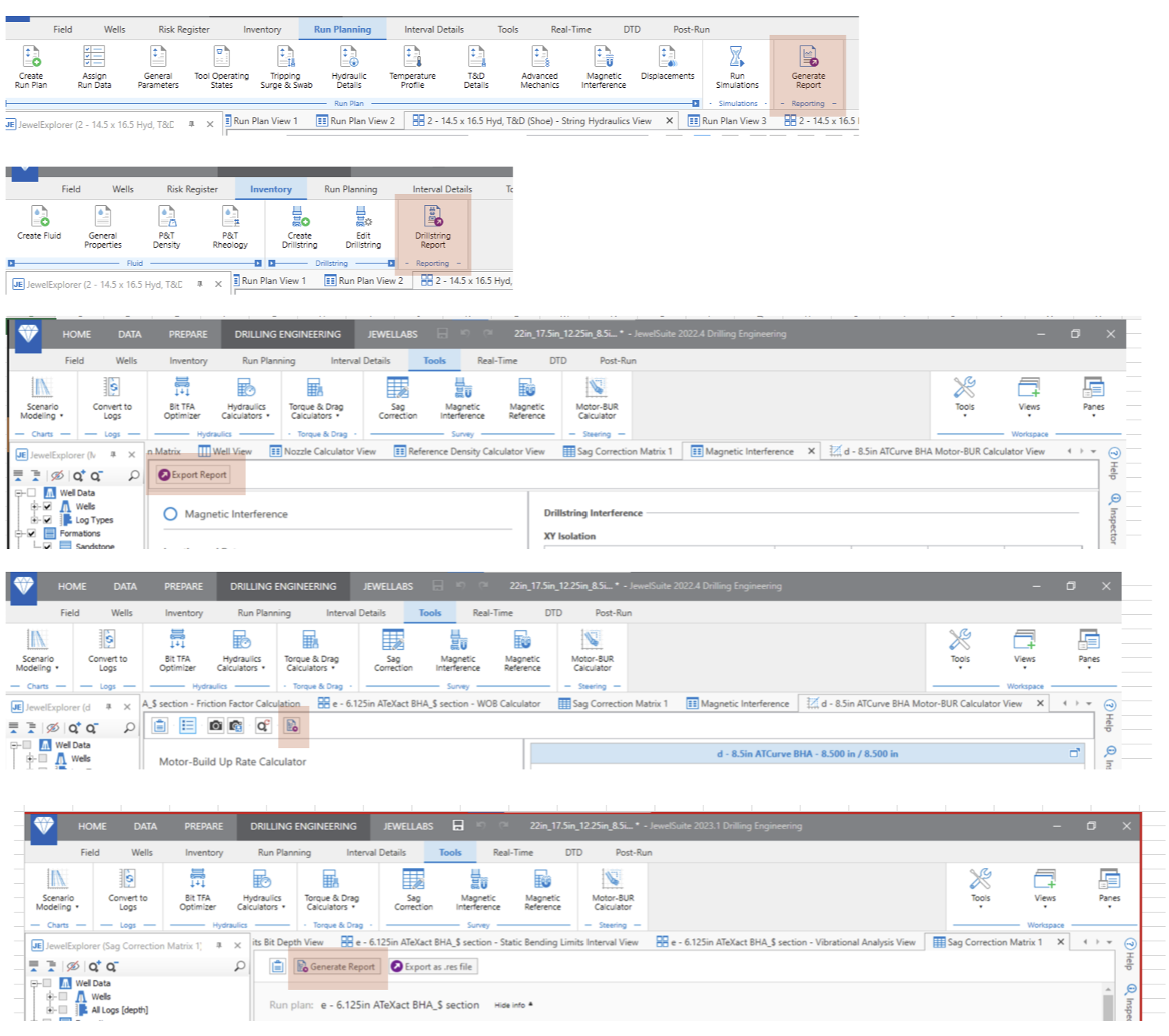
Locations in the software to generate a report
4. Template Integration Complexity
Templates were valuable but underused:
Users requested a feature that already existed
The workflow for creating, editing, and reusing templates was unclear
Technical constraints required careful definition of template behavior
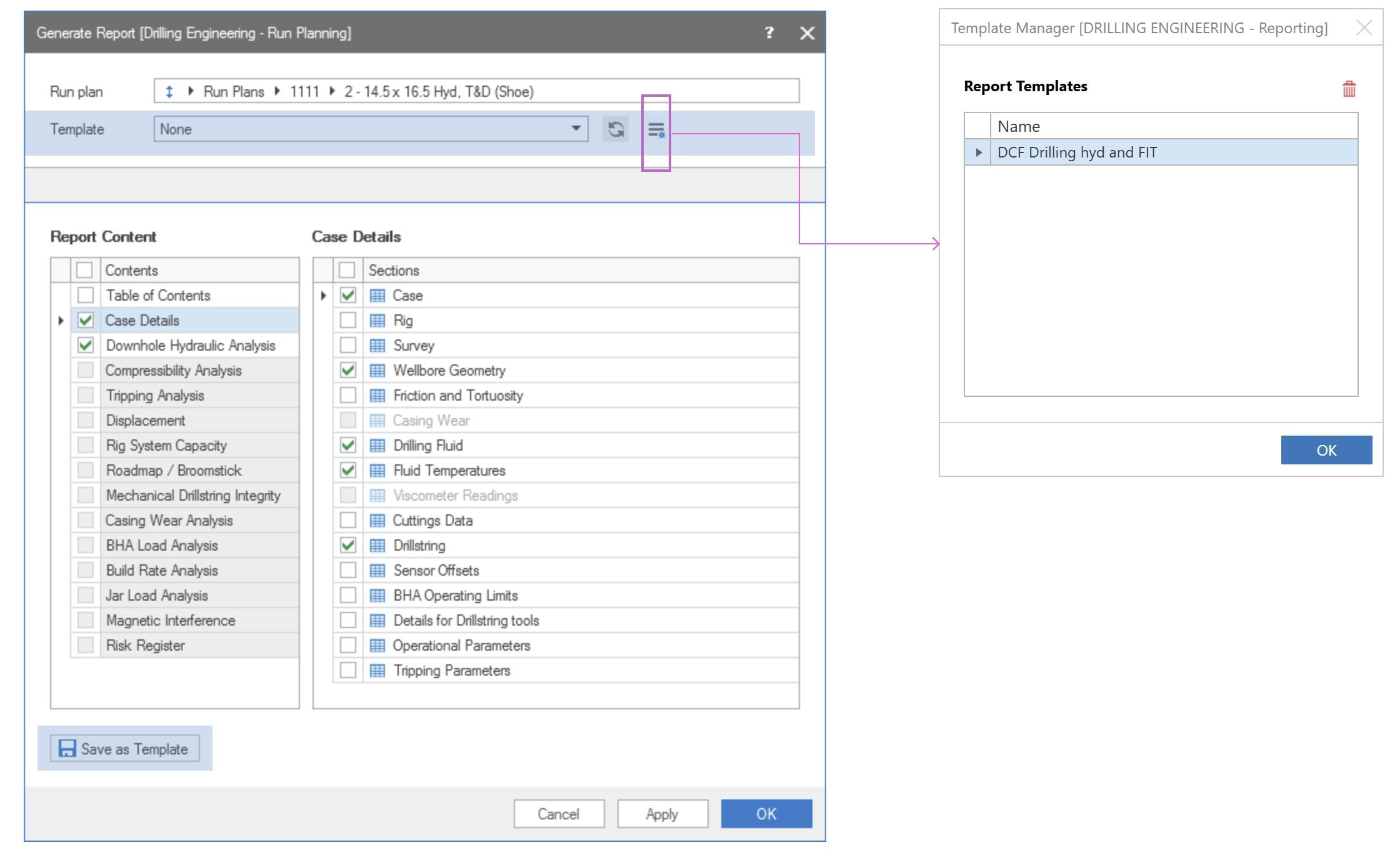
Template buttons in the form
Design Opportunities & Success Criteria
This initiative aimed to:
Make the reporting process fast, efficient, and intuitive
Centralize all reporting options in one clear location
Create fit‑to‑purpose flows for different report types
Improve visibility and usability of templates
Support future report types without increasing complexity
Users
Application engineers
Drilling engineers
Real‑time engineers
Support roles


Goal With The New Proposal
1.
One centralized place where the user can find all available reports
2.
Create a fit to purpose forms that will simplify the process of editing the report data
3.
A quick way to generate a report
4.
Give better exposer to the template feature
5.
Add a solution to produce a short one page report
6.
Clear separation between short report and comprehensive report
Proposed New User Journey’s
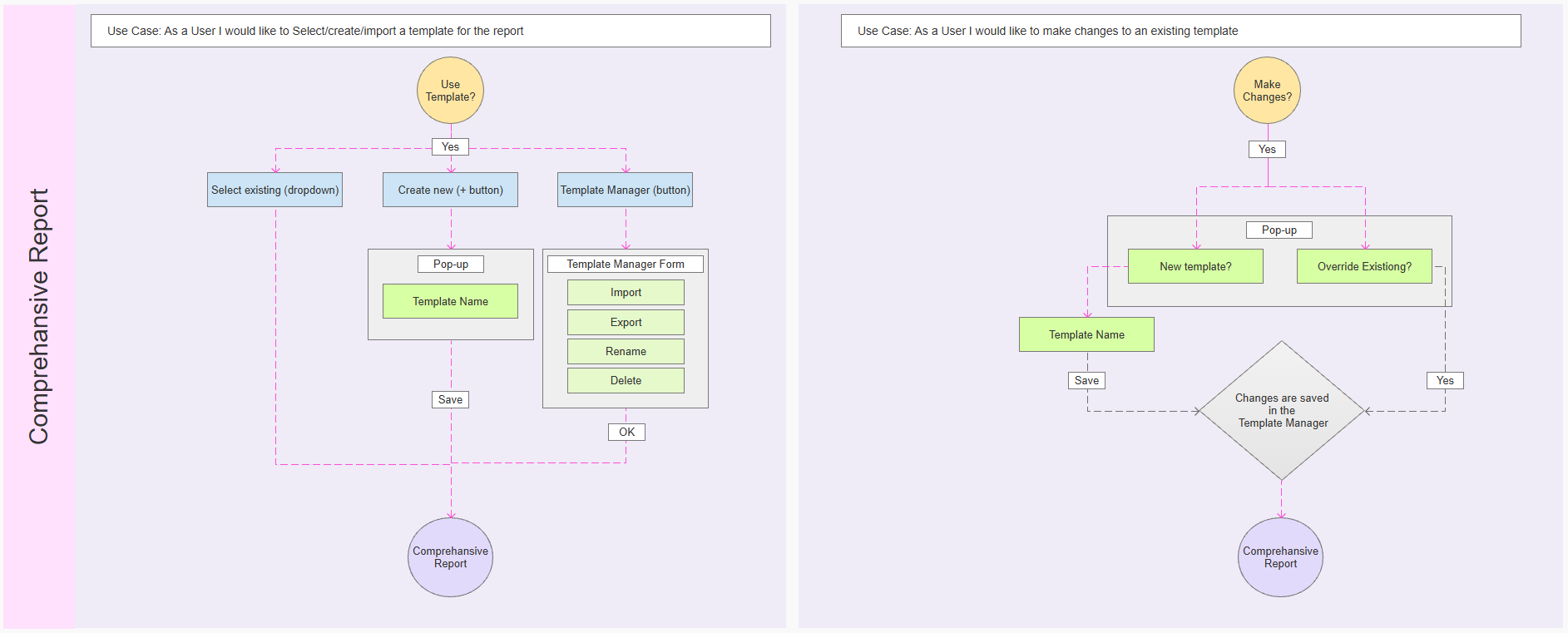
Comprehensive Report workflow
User Goal
Create a detailed comprehensive report for internal and external use.

Short Report workflow
User Goal
Create a short report quickly with focused results.
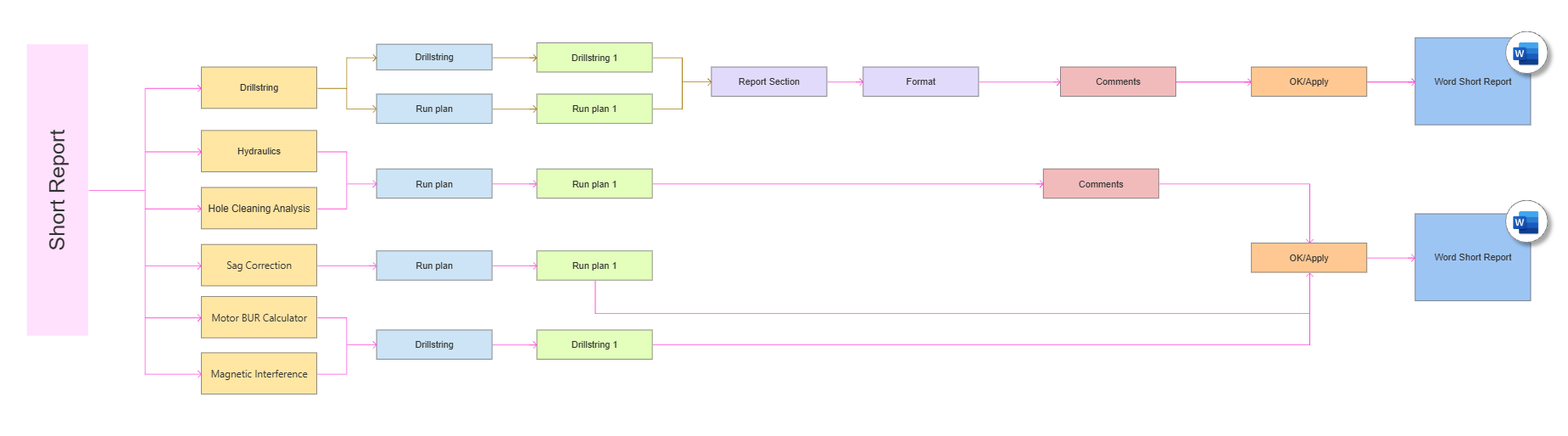
Template Scenarios
User Goal
Creating or importing templates
Modifying existing templates
Preserving template integrity across reports
Constraints & Trade‑offs
The feature was already widely used, limiting disruptive changes
Reporting affected multiple teams and workflows
Technical constraints required clear template logic
New functionality needed to scale without re‑architecting again
Trade‑off:
Rather than extending the existing form, I advocated for separating report types and workflows, accepting short‑term adjustment for long‑term clarity, consistency, and scalability.
Reframing Export as a System, Not an Action
Instead of optimizing the export interaction visually, the design focus shifted to making system states visible and predictable.
This meant treating export as a flow with clear phases rather than a single event, and designing for:
System feedback over time
Clear success, progress, and failure states
Explicit user control and reassurance
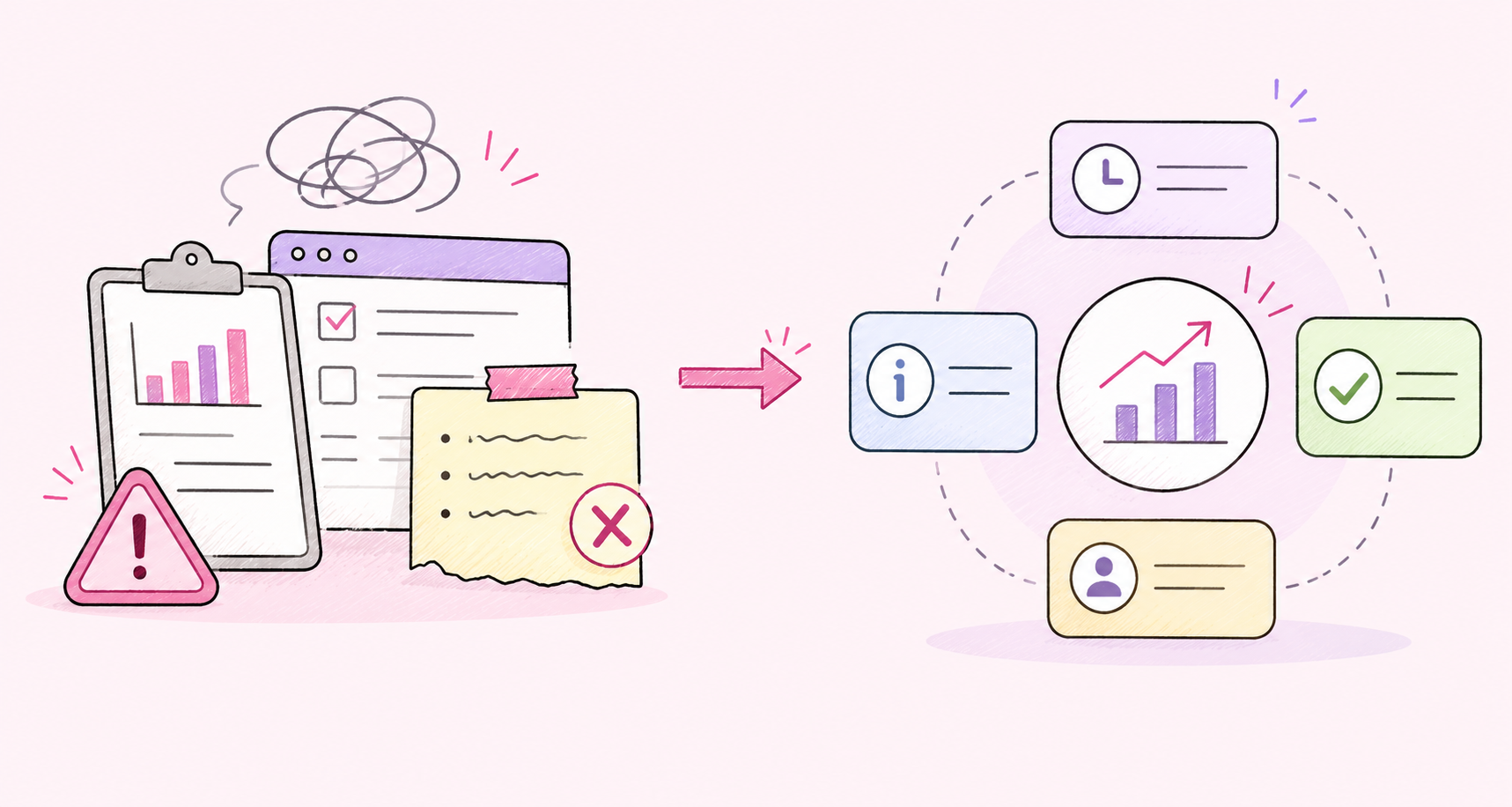
Reframing export as a system made it clear that the problem wasn’t the UI itself, but the lack of transparency and predictability in how the system behaved.
The Resulting Export Experience
The final outcome:
Centralized all reporting options into a single, discoverable location
Clearly separated short reports and comprehensive reports
Simplified the reporting flow into fit‑to‑purpose steps
Made templates visible, understandable, and reusable
Established a consistent reporting experience across the platform
Rather than fixing a single dialog, the work redefined reporting as a coherent system.

New dedicated reporting navigation
New workflow forms - each dedicated for one action
Impact on User Confidence & Workflow Efficiency
Reduced time and effort required to generate reports
Improved consistency across reporting workflows
Increased awareness and use of templates
Enabled future report types without adding complexity
Improved trust in the reporting feature as a core workflow
Reflections & Forward‑Looking Considerations
This project demonstrated how usability issues in mature products are often symptoms of structural and organizational complexity.
By stepping back and treating reporting as a system rather than a form, we were able to improve efficiency, scalability, and user confidence across roles.
It also reinforced the importance of UX leadership in advocating for investment in foundational improvements—not just visible features.